Xovis Manager
About
This integration automatically adds devices and functions for counters made by Xovis. They have different models of sensors that use dual cameras to count people. The sensors also have the ability to distinguish children from adults, as well as female/male based on an AI algorithm.
Configuration
Device configuration
Lines, zones and areas
Firstly the device needs to be configured with the desired counter objects. When the device is configured correctly the statistics data should be shown under the Live and Analytics tabs.
Data push
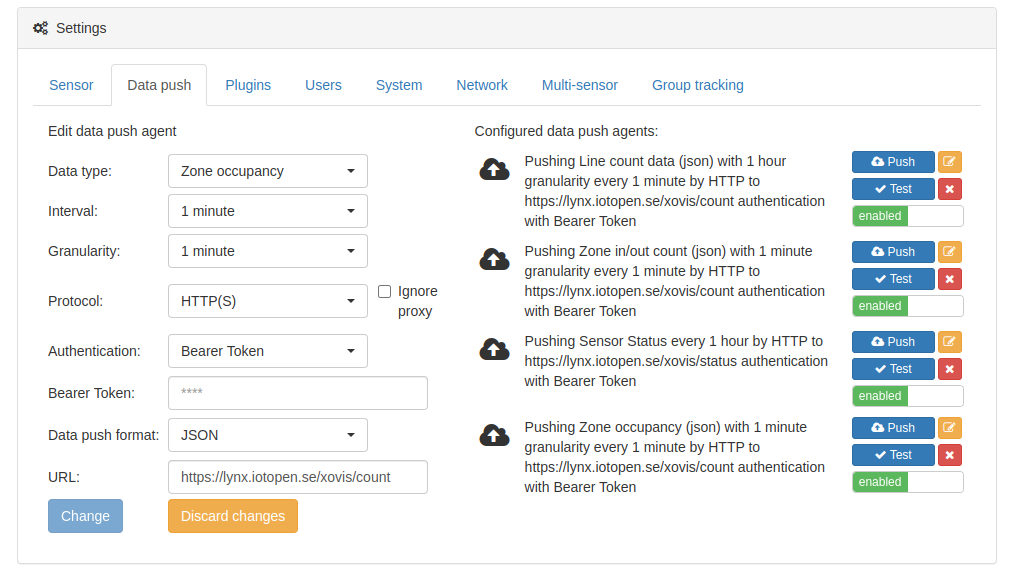
Each type of data push setting needs to be set up using the web-interface on the device. Only some of the data-types are supported. The interval and granularity settings can be used as desired.
Authentication to the IoT Open platform needs to be set with a Bearer token received from your platform representative together with the correct URLs.
All Data Push objects need to be set to the JSON format, except for Sensor Status where XML is the only format.
Example configuration:
Installation settings
The receiving installation needs to be prepared by adding metadata to tell where each device serial should be added. The data key xovis.device_serials is used to specify one or several (comma-separated) serial numbers of the devices that should be added to the installation.